Ignite Your Projects with Fire Ember Overlay Backgrounds
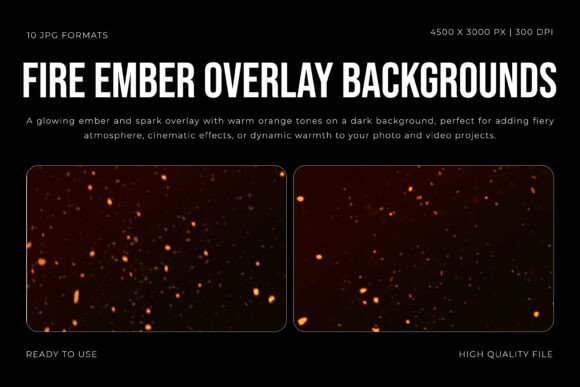
There's a specific challenge in digital art and design: capturing the ephemeral, dynamic beauty of fire. A static image often lacks the heat, the motion, and the glowing depth of real embers. This is where a specialized tool like the Fire Ember Overlay Backgrounds collection becomes invaluable. It's not just a set of textures; it's a curated library of atmospheric elements designed to inject life and energy into your work. The collection offers ten distinct, high-resolution JPG files, each showcasing a mesmerizing dance of glowing orange sparks and deep, warm embers against a rich, dark backdrop. The visual personality is one of controlled chaos and natural beauty—perfect for creating a cinematic, dramatic, or simply warmer mood.
The Anatomy of a Fiery Atmosphere
What makes these overlays effective is their thoughtful design. Each texture in the Fire Ember Overlay Backgrounds set captures realistic light behavior. You'll find smooth gradients that transition from intense, bright cores to softer, diffused glows. The floating ember particles vary in size and density, creating a sense of depth and movement that feels organic. This isn't a flat, repeating pattern; it's a collection of moments frozen in time. The high resolution of 4500x3000 pixels at 300 DPI ensures that even when scaled for large-format prints or detailed digital composites, the quality remains crisp and professional. The dark background is intentionally neutral, allowing the fiery elements to stand out and blend seamlessly with your existing project layers.
Where Heat Meets Creativity: Practical Applications
Understanding the visual style is one thing; knowing where to apply it is another. The strength of the Fire Ember Overlay Backgrounds lies in their versatility across different creative mediums. They are particularly powerful for projects that require a sense of energy, warmth, or dramatic flair.
- Cinematic and Video Editing: Use these overlays to enhance campfire scenes, add intensity to action sequences, or create dreamlike transition effects. Blending them in "Screen" or "Add" mode can instantly elevate a video's production value.
- Photography Overlays: Portrait, event, or conceptual photographers can use these to add a magical, fiery bokeh effect or a warm, glowing ambiance to their images. They're excellent for creative composites or adding a spark to night-time shots.
- Digital and Print Design: For graphic designers, these assets are gold. They can form the background for a striking poster, a social media graphic, or a book cover. The warm tones naturally draw the eye, making them ideal for designs related to events, festivals, or brands that want to convey passion and intensity.
- Brand Identity and Marketing: A brand centered around warmth, energy, or craftsmanship (think artisanal foods, outdoor adventure, or even a bold fitness brand) could use subtle ember textures in their marketing materials to reinforce their core message. It adds a layer of sensory appeal that plain colors can't match.
Making the Embers Work for You: A Designer's Guide
Simply placing an overlay on top of an image won't guarantee a professional result. Effective use requires a thoughtful approach to integration and composition. First, consider the blending mode. Experiment with modes like Screen, Lighten, or Color Dodge to make the dark background of the overlay disappear and leave only the glowing embers. Adjusting the opacity is crucial—sometimes a subtle hint of heat is more powerful than a full blaze.
Next, think about visual hierarchy. The embers should enhance, not overwhelm. Use them to guide the viewer's eye toward a focal point, like a product or a person's face. You can also use layer masks to selectively reveal or hide parts of the overlay, creating a more custom and integrated look. For instance, masking the embers so they only appear around the edges of a frame can create a beautiful vignette effect.
Pairing with Type and Other Elements
The fiery, dynamic nature of these overlays has a direct impact on typography and overall design consistency. When using the Fire Ember Overlay Backgrounds, choose typefaces that complement their energy without competing. A strong, clean sans serif font often works well for headlines, providing modern contrast to the organic textures. For a more thematic approach, a bold display font can amplify the dramatic feel. Avoid overly delicate script fonts or highly detailed serif fonts that might get lost or clash with the visual noise of the embers.
From a branding perspective, consistency is key. If you adopt this style for a campaign, carry the warm color palette and energy through all your assets—from social media graphics to website banners. This creates a cohesive and recognizable brand experience. The overlays are a design asset, and like any asset, their power is multiplied when used strategically as part of a larger brand identity system.
Evaluating Fit and Final Thoughts
Before diving in, take a moment to evaluate if these overlays are the right fit for your project. Does your message align with themes of warmth, passion, energy, or transformation? Is the aesthetic you're aiming for cinematic, dramatic, or magical? Test the overlays on a small section of your work first. See how the colors interact with your existing palette and how the textures affect the readability of your text. The commercial license typically included with such premium font and asset collections allows for broad use in client work, merchandise, and digital products, but always review the specific terms.
Ultimately, the Fire Ember Overlay Backgrounds are more than just pretty pictures of sparks. They are a practical tool for solving a common creative problem: adding life and emotion to a digital canvas. Used with intention, they can transform a flat design into an immersive experience, helping your work stand out in a crowded visual landscape. They offer a shortcut to a complex, beautiful effect that would be difficult and time-consuming to create from scratch, making them a valuable addition to any creative professional's toolkit.